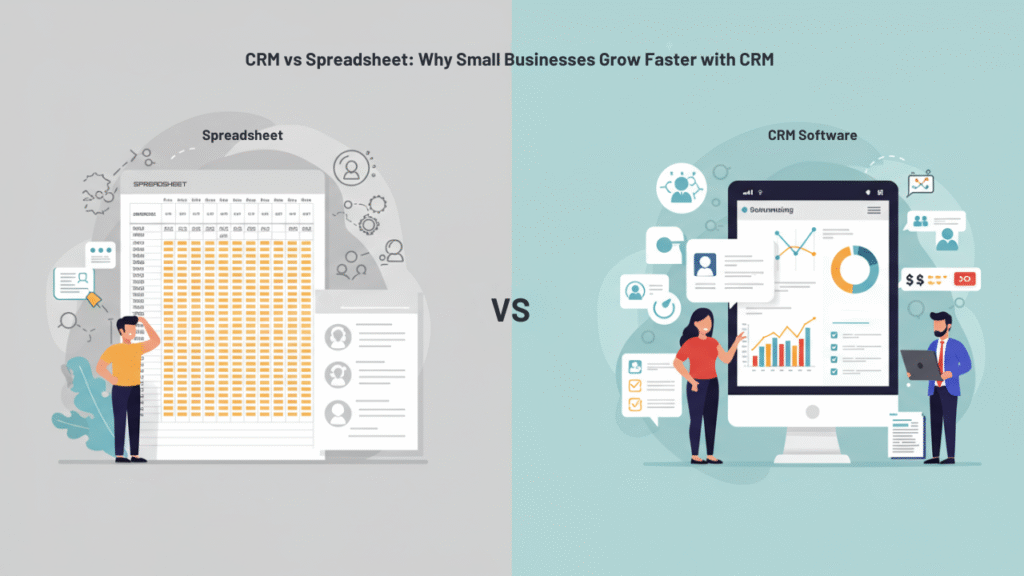
Small business owners often start with spreadsheets to track customers, but quickly hit roadblocks as their business grows. What begins as a simple Excel file with contact information soon becomes an

Small business owners often start with spreadsheets to track customers, but quickly hit roadblocks as their business grows. What begins as a simple Excel file with contact information soon becomes an

Small business owners often start with spreadsheets to track customers, but quickly hit roadblocks as their business grows. What begins as a simple Excel file with contact information soon becomes an unwieldy mess of scattered data, missed follow-ups, and lost opportunities. If you’re still managing customer relationships through spreadsheets, you’re not alone—but you might be holding your business back from its full potential.
In this guide, we’ll explore the key differences between spreadsheets and CRM systems, why successful businesses eventually outgrow manual tracking methods, and how the right CRM software for small business can transform your customer management and sales process.
The fundamental difference between spreadsheets and CRM systems lies in their purpose and capabilities. While spreadsheets were designed for calculations and data organization, CRMs were built specifically for managing customer relationships and driving sales growth.
| Feature | Spreadsheet | CRM System |
|---|---|---|
| Lead Tracking | Manual entry, prone to errors | Automated capture and organization |
| Sales Pipeline | Basic columns, no visual flow | Visual pipeline with stage tracking |
| Follow-up Reminders | None (requires external calendar) | Automated reminders and notifications |
| Collaboration | Version conflicts, limited sharing | Real-time collaboration, role-based access |
| Reporting | Manual calculations, static charts | Automated reports, dynamic dashboards |
| Integration | Limited connectivity | Connects with email, phone, marketing tools |
| Data Security | Basic file protection | Enterprise-level security and backups |
| Scalability | Becomes unwieldy with growth | Designed to handle thousands of records |
Small business struggles with spreadsheets become apparent quickly. Manual data entry leads to inconsistencies, duplicates slip through the cracks, and critical follow-ups get forgotten in the maze of rows and columns. When comparing spreadsheet vs CRM for sales tracking, the limitations of manual systems become a significant bottleneck to growth.
When customer lists grow beyond 50-100 contacts, spreadsheets become time-consuming and unreliable. For small businesses in Twin Falls, where competition is fierce across industries, this inefficiency can mean the difference between thriving and merely surviving.
Consider the common challenges faced by local businesses:
Real Estate Agents: Managing dozens of prospects across different property types, price ranges, and buying timelines becomes impossible when every interaction requires manual updates across multiple spreadsheet tabs.
Home Service Providers: Plumbers, electricians, and contractors in Twin Falls need to track service calls, follow up on estimates, and manage recurring maintenance contracts—tasks that quickly overwhelm spreadsheet capabilities.
Local Retail Businesses: Store owners in Twin Falls juggling walk-in customers, online inquiries, and repeat buyers need systems that can segment customers and automate personalized communications.
The small business CRM benefits become clear when you consider that these growing businesses need more than just contact storage—they need systems that actively help them nurture relationships and close more deals.
Modern CRM systems excel at storing, sorting, and highlighting high-intent leads in ways that spreadsheets simply cannot match. Research shows that small businesses adopting CRM software see up to 29% increase in sales, largely due to improved lead management and follow-up consistency.
Intelligent Data Organization: CRMs automatically categorize contacts based on behavior, purchase history, and engagement levels. Instead of scrolling through hundreds of rows to find hot prospects, the system surfaces your most promising opportunities.
Automated Data Enrichment: Many CRM platforms automatically fill in missing contact information, social media profiles, and company details, creating richer customer profiles without manual research.
Lead Scoring: Advanced CRM for managing customer data includes scoring systems that rank prospects based on their likelihood to purchase, helping you prioritize your time and energy.
In Twin Falls, where competition is strong across all sectors, businesses that know which leads are most likely to buy can scale faster and more efficiently than those still relying on manual tracking methods.
Let’s examine two similar businesses to see the practical difference:
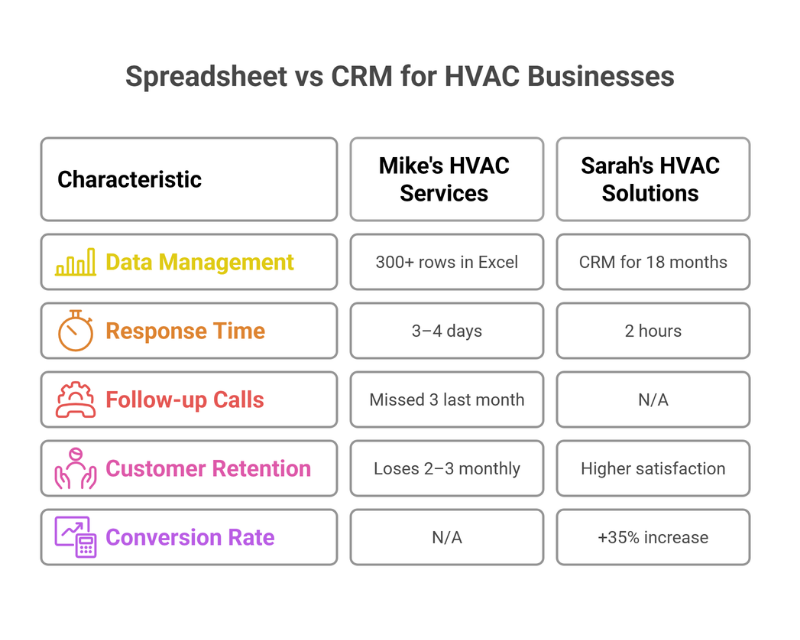
Spreadsheet User – Mike’s HVAC Services: Mike started tracking customers in Excel two years ago. His spreadsheet contains 300+ rows with basic contact info and service notes scattered across different columns. Last month, he missed three follow-up calls because he forgot to check his “next contact” column. A high-value commercial prospect went to a competitor after Mike failed to respond to their email inquiry within 48 hours—it got buried in his inbox with no system to track it. His average response time to new leads is 3-4 days, and he estimates he loses 2-3 potential customers monthly due to poor follow-up.
CRM User – Sarah’s HVAC Solutions: Sarah implemented a CRM system 18 months ago after outgrowing her spreadsheet. Her system automatically captures leads from her website, emails, and phone calls. When prospects submit service requests, the CRM immediately sends automated acknowledgments and creates follow-up tasks. Sarah’s average response time improved to under 2 hours, and automated reminders ensure no lead falls through the cracks. Since switching, her conversion rate increased by 35%, and customer satisfaction scores improved due to consistent communication.
A Twin Falls-based plumbing company that made a similar switch reported improving their response times by 40% and increasing their close rate on estimates from 23% to 31% within six months of CRM implementation.
When evaluating CRM software for small business, consider these essential criteria:
Ease of Use: Your team should be able to learn the system quickly without extensive training. Look for intuitive interfaces and mobile accessibility for field-based workers.
Affordability: Small business budgets require cost-effective solutions. Consider total cost of ownership, including setup, training, and monthly fees.
Integration Capabilities: Your CRM should connect seamlessly with existing tools like email, accounting software, and marketing platforms.
Local Support: Having access to responsive customer support, especially during business hours in Twin Falls, can make the difference during critical implementations.
Scalability: Choose a system that can grow with your business, accommodating more users, contacts, and advanced features as needed.
Consider Integration vs. Standalone: Evaluate whether you need a dedicated CRM or would benefit from an integrated business platform that combines CRM with other essential tools like website management, invoicing, and marketing automation. Many small businesses find that integrated solutions provide better value and eliminate the need to manage multiple software subscriptions.
Popular options include cloud-based solutions that offer free trials, allowing you to test functionality before committing. The key is finding a system that matches your specific industry needs and technical comfort level.
Is your spreadsheet holding your business back? If you’re spending more time managing data than serving customers, it’s time to evaluate your systems. The transition from spreadsheets to CRM software represents more than a technology upgrade—it’s an investment in your business’s ability to scale efficiently and compete effectively.
Start by auditing your current process: How much time do you spend on data entry? How many opportunities slip through the cracks? What’s the real cost of missed follow-ups and poor customer communication?
Explore how a CRM can streamline your customer management and sales processes in Twin Falls. The right system will not only organize your current contacts but provide the foundation for sustainable business growth.
Ready to take the next step? LeadProspecting Ai combines CRM, marketing automation, and customer management tools in one easy-to-use platform—designed specifically for small businesses in Twin Falls.
What is the difference between a CRM and a spreadsheet? A spreadsheet is a basic data storage tool designed for calculations and simple organization. A CRM is a specialized system built for managing customer relationships, with features like automated follow-ups, sales pipeline tracking, and integration with other business tools.
Why do small businesses in Twin Falls switch from spreadsheets to CRM software? Local businesses typically make the switch when they realize spreadsheets can’t scale with growth. As customer bases expand beyond 50-100 contacts, manual tracking becomes time-consuming and error-prone, leading to missed opportunities and poor customer experience.
Is CRM software expensive for small businesses? Modern CRM solutions offer affordable options starting from $10-20 per user per month. When you consider the cost of missed opportunities and time spent on manual data management, CRM systems typically pay for themselves within months.
Can I migrate my Excel data into a CRM easily? Yes, most CRM platforms offer data import tools that can handle CSV files exported from Excel. Many systems also provide migration assistance to ensure smooth transitions without data loss.
How does CRM help with sales tracking compared to spreadsheets? CRMs provide visual sales pipelines, automated stage updates, and real-time reporting that spreadsheets can’t match. They track customer interactions automatically and provide insights into sales performance and opportunities.
Do CRMs work for service businesses in Twin Falls? Absolutely. Service businesses like plumbers, electricians, landscapers, and repair services benefit greatly from CRM features like appointment scheduling, service history tracking, and automated follow-ups for maintenance reminders.
What are the benefits of CRM for managing customer data? CRMs provide centralized data storage, automated data enrichment, duplicate detection, advanced search capabilities, and secure backup systems that far exceed spreadsheet limitations.
How many customers make a CRM necessary for small businesses? Most businesses start feeling spreadsheet limitations around 50-100 customers. However, even smaller businesses can benefit from CRM automation and professional customer communication features.
Which CRM software is best for small business owners in Twin Falls? The best CRM depends on your specific industry, budget, and technical requirements. Consider factors like ease of use, local support availability, integration capabilities, and whether you need standalone CRM or integrated business platforms.
What mistakes should Twin Falls business owners avoid when switching from spreadsheets to CRM? Common mistakes include choosing overly complex systems, failing to clean data before migration, not training staff properly, and expecting immediate results. Take time to plan the transition and ensure team buy-in for successful adoption.
Written by
LPAI Team
Helping businesses grow with AI-powered lead generation, CRM automation, and data-driven marketing strategies.

Set up a CRM in one weekend. Twin Falls and Magic Valley service businesses can capture leads, automate follow-up, and stop losing jobs with a simple system.

Set up a service business CRM in one weekend without complexity. Learn how to capture leads, automate follow-up, stay organized, and build a system that works while you focus on the job.

If you’re active in Twin Falls Chamber events, Jerome business groups, or trade associations across the Magic Valley, you already have the hardest part of affiliate marketing solved: trust. One-
Automated posting, review management, and analytics — all in one dashboard.
Learn MoreSmall business owners often start with spreadsheets to track customers, but quickly hit roadblocks as their business grows. What begins as a simple Excel file with contact information soon becomes an unwieldy mess of scattered data, missed follow-ups, and lost opportunities. If you’re still managing customer relationships through spreadsheets, you’re not alone—but you might be holding your business back from its full potential.
In this guide, we’ll explore the key differences between spreadsheets and CRM systems, why successful businesses eventually outgrow manual tracking methods, and how the right CRM software for small business can transform your customer management and sales process.
The fundamental difference between spreadsheets and CRM systems lies in their purpose and capabilities. While spreadsheets were designed for calculations and data organization, CRMs were built specifically for managing customer relationships and driving sales growth.
| Feature | Spreadsheet | CRM System |
|---|---|---|
| Lead Tracking | Manual entry, prone to errors | Automated capture and organization |
| Sales Pipeline | Basic columns, no visual flow | Visual pipeline with stage tracking |
| Follow-up Reminders | None (requires external calendar) | Automated reminders and notifications |
| Collaboration | Version conflicts, limited sharing | Real-time collaboration, role-based access |
| Reporting | Manual calculations, static charts | Automated reports, dynamic dashboards |
| Integration | Limited connectivity | Connects with email, phone, marketing tools |
| Data Security | Basic file protection | Enterprise-level security and backups |
| Scalability | Becomes unwieldy with growth | Designed to handle thousands of records |
Small business struggles with spreadsheets become apparent quickly. Manual data entry leads to inconsistencies, duplicates slip through the cracks, and critical follow-ups get forgotten in the maze of rows and columns. When comparing spreadsheet vs CRM for sales tracking, the limitations of manual systems become a significant bottleneck to growth.
When customer lists grow beyond 50-100 contacts, spreadsheets become time-consuming and unreliable. For small businesses in Twin Falls, where competition is fierce across industries, this inefficiency can mean the difference between thriving and merely surviving.
Consider the common challenges faced by local businesses:
Real Estate Agents: Managing dozens of prospects across different property types, price ranges, and buying timelines becomes impossible when every interaction requires manual updates across multiple spreadsheet tabs.
Home Service Providers: Plumbers, electricians, and contractors in Twin Falls need to track service calls, follow up on estimates, and manage recurring maintenance contracts—tasks that quickly overwhelm spreadsheet capabilities.
Local Retail Businesses: Store owners in Twin Falls juggling walk-in customers, online inquiries, and repeat buyers need systems that can segment customers and automate personalized communications.
The small business CRM benefits become clear when you consider that these growing businesses need more than just contact storage—they need systems that actively help them nurture relationships and close more deals.
Modern CRM systems excel at storing, sorting, and highlighting high-intent leads in ways that spreadsheets simply cannot match. Research shows that small businesses adopting CRM software see up to 29% increase in sales, largely due to improved lead management and follow-up consistency.
Intelligent Data Organization: CRMs automatically categorize contacts based on behavior, purchase history, and engagement levels. Instead of scrolling through hundreds of rows to find hot prospects, the system surfaces your most promising opportunities.
Automated Data Enrichment: Many CRM platforms automatically fill in missing contact information, social media profiles, and company details, creating richer customer profiles without manual research.
Lead Scoring: Advanced CRM for managing customer data includes scoring systems that rank prospects based on their likelihood to purchase, helping you prioritize your time and energy.
In Twin Falls, where competition is strong across all sectors, businesses that know which leads are most likely to buy can scale faster and more efficiently than those still relying on manual tracking methods.
Let’s examine two similar businesses to see the practical difference:
Spreadsheet User – Mike’s HVAC Services: Mike started tracking customers in Excel two years ago. His spreadsheet contains 300+ rows with basic contact info and service notes scattered across different columns. Last month, he missed three follow-up calls because he forgot to check his “next contact” column. A high-value commercial prospect went to a competitor after Mike failed to respond to their email inquiry within 48 hours—it got buried in his inbox with no system to track it. His average response time to new leads is 3-4 days, and he estimates he loses 2-3 potential customers monthly due to poor follow-up.
CRM User – Sarah’s HVAC Solutions: Sarah implemented a CRM system 18 months ago after outgrowing her spreadsheet. Her system automatically captures leads from her website, emails, and phone calls. When prospects submit service requests, the CRM immediately sends automated acknowledgments and creates follow-up tasks. Sarah’s average response time improved to under 2 hours, and automated reminders ensure no lead falls through the cracks. Since switching, her conversion rate increased by 35%, and customer satisfaction scores improved due to consistent communication.
A Twin Falls-based plumbing company that made a similar switch reported improving their response times by 40% and increasing their close rate on estimates from 23% to 31% within six months of CRM implementation.
When evaluating CRM software for small business, consider these essential criteria:
Ease of Use: Your team should be able to learn the system quickly without extensive training. Look for intuitive interfaces and mobile accessibility for field-based workers.
Affordability: Small business budgets require cost-effective solutions. Consider total cost of ownership, including setup, training, and monthly fees.
Integration Capabilities: Your CRM should connect seamlessly with existing tools like email, accounting software, and marketing platforms.
Local Support: Having access to responsive customer support, especially during business hours in Twin Falls, can make the difference during critical implementations.
Scalability: Choose a system that can grow with your business, accommodating more users, contacts, and advanced features as needed.
Consider Integration vs. Standalone: Evaluate whether you need a dedicated CRM or would benefit from an integrated business platform that combines CRM with other essential tools like website management, invoicing, and marketing automation. Many small businesses find that integrated solutions provide better value and eliminate the need to manage multiple software subscriptions.
Popular options include cloud-based solutions that offer free trials, allowing you to test functionality before committing. The key is finding a system that matches your specific industry needs and technical comfort level.
Is your spreadsheet holding your business back? If you’re spending more time managing data than serving customers, it’s time to evaluate your systems. The transition from spreadsheets to CRM software represents more than a technology upgrade—it’s an investment in your business’s ability to scale efficiently and compete effectively.
Start by auditing your current process: How much time do you spend on data entry? How many opportunities slip through the cracks? What’s the real cost of missed follow-ups and poor customer communication?
Explore how a CRM can streamline your customer management and sales processes in Twin Falls. The right system will not only organize your current contacts but provide the foundation for sustainable business growth.
Ready to take the next step? LeadProspecting Ai combines CRM, marketing automation, and customer management tools in one easy-to-use platform—designed specifically for small businesses in Twin Falls.
What is the difference between a CRM and a spreadsheet? A spreadsheet is a basic data storage tool designed for calculations and simple organization. A CRM is a specialized system built for managing customer relationships, with features like automated follow-ups, sales pipeline tracking, and integration with other business tools.
Why do small businesses in Twin Falls switch from spreadsheets to CRM software? Local businesses typically make the switch when they realize spreadsheets can’t scale with growth. As customer bases expand beyond 50-100 contacts, manual tracking becomes time-consuming and error-prone, leading to missed opportunities and poor customer experience.
Is CRM software expensive for small businesses? Modern CRM solutions offer affordable options starting from $10-20 per user per month. When you consider the cost of missed opportunities and time spent on manual data management, CRM systems typically pay for themselves within months.
Can I migrate my Excel data into a CRM easily? Yes, most CRM platforms offer data import tools that can handle CSV files exported from Excel. Many systems also provide migration assistance to ensure smooth transitions without data loss.
How does CRM help with sales tracking compared to spreadsheets? CRMs provide visual sales pipelines, automated stage updates, and real-time reporting that spreadsheets can’t match. They track customer interactions automatically and provide insights into sales performance and opportunities.
Do CRMs work for service businesses in Twin Falls? Absolutely. Service businesses like plumbers, electricians, landscapers, and repair services benefit greatly from CRM features like appointment scheduling, service history tracking, and automated follow-ups for maintenance reminders.
What are the benefits of CRM for managing customer data? CRMs provide centralized data storage, automated data enrichment, duplicate detection, advanced search capabilities, and secure backup systems that far exceed spreadsheet limitations.
How many customers make a CRM necessary for small businesses? Most businesses start feeling spreadsheet limitations around 50-100 customers. However, even smaller businesses can benefit from CRM automation and professional customer communication features.
Which CRM software is best for small business owners in Twin Falls? The best CRM depends on your specific industry, budget, and technical requirements. Consider factors like ease of use, local support availability, integration capabilities, and whether you need standalone CRM or integrated business platforms.
What mistakes should Twin Falls business owners avoid when switching from spreadsheets to CRM? Common mistakes include choosing overly complex systems, failing to clean data before migration, not training staff properly, and expecting immediate results. Take time to plan the transition and ensure team buy-in for successful adoption.
Written by
LPAI Team
Helping businesses grow with AI-powered lead generation, CRM automation, and data-driven marketing strategies.

Set up a CRM in one weekend. Twin Falls and Magic Valley service businesses can capture leads, automate follow-up, and stop losing jobs with a simple system.

Set up a service business CRM in one weekend without complexity. Learn how to capture leads, automate follow-up, stay organized, and build a system that works while you focus on the job.

If you’re active in Twin Falls Chamber events, Jerome business groups, or trade associations across the Magic Valley, you already have the hardest part of affiliate marketing solved: trust. One-
Automated posting, review management, and analytics — all in one dashboard.
Learn More