One in six emails never reach the inbox. This guide covers how email warming works, compares six drip platforms with real strengths and weaknesses, and a five-email sequence for service businesses.

One in six emails never reach the inbox. This guide covers how email warming works, compares six drip platforms with real strengths and weaknesses, and a five-email sequence for service businesses.

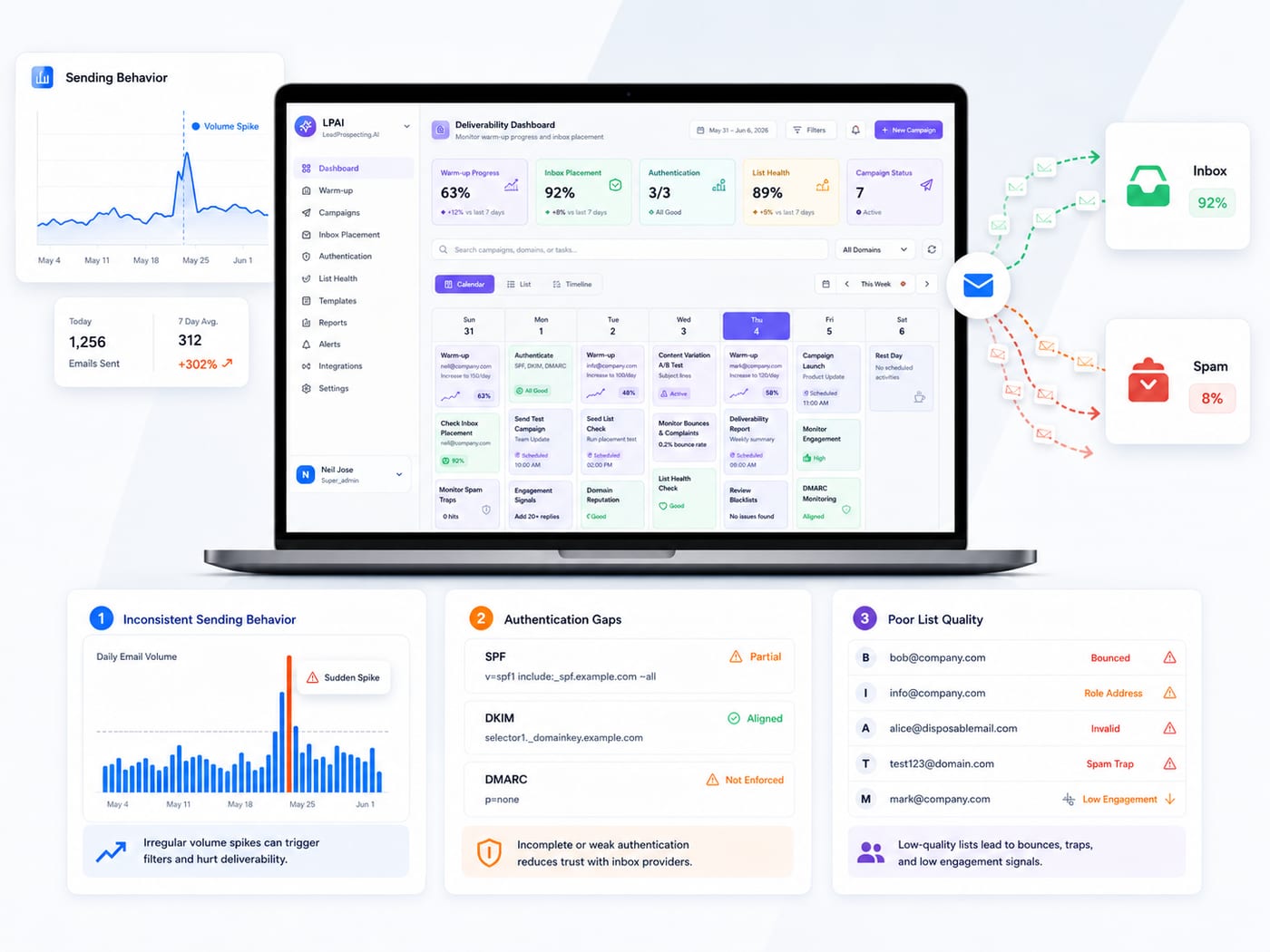
Email marketing still delivers the highest ROI of any channel ($36 for every $1 spent according to Litmus), but only if your emails actually reach the inbox. Validity's 2026 benchmark report puts the global average inbox placement rate at just 83%, meaning roughly 1 in 6 emails disappear before anyone sees them. This guide covers three things in depth: how email warming works and why it matters, an honest comparison of the major drip platforms (including where each one genuinely wins and loses), and a step-by-step drip campaign framework built for service businesses. Every stat is sourced.
A contractor in Twin Falls builds a list of 400 past customers and prospects over six months. He writes a solid promotional email announcing a spring HVAC tune-up special. He hits send on a Monday morning from his business domain. By Wednesday, his open rate is 6%. He blames the subject line. He rewrites it. Sends again to the unopened segment. Open rate drops to 3%. He stops emailing entirely and concludes "email doesn't work for my business."
The email was fine. The subject line was fine. The problem was that his sending domain had no reputation with Gmail, Outlook, or Yahoo. Every major inbox provider scores your domain before deciding whether to deliver your message to the inbox, the promotions tab, the spam folder, or nowhere at all. A domain with no sending history looks identical to a spam operation that registered yesterday and plans to blast 10,000 messages before disappearing.
An email warming tool builds your domain's reputation by gradually simulating normal email activity before you run any real campaigns. It sends messages between real accounts, opens them, marks them as important, replies to them, and pulls them out of spam when they land there. Over two to four weeks, inbox providers see a pattern of legitimate, engaged communication from your domain and start trusting it.
This is not optional anymore. Google's published sender guidelines require SPF, DKIM, and DMARC authentication for anyone sending to Gmail, and recommend keeping spam complaint rates below 0.1%. As of late 2025, Gmail actively rejects non-compliant mail. Microsoft began enforcing similar requirements in May 2025. If your domain isn't authenticated and warmed, your emails don't just land in spam. They get rejected at the server level before they reach any folder at all.
According to Validity's 2026 benchmark report, the global average inbox placement rate is approximately 83%. That means roughly 1 in 6 legitimate, permission-based marketing emails never reach the inbox. For cold outreach from unwarmed domains, the numbers are significantly worse.
The gap between a warmed and unwarmed domain is enormous in practice. On a list of 500 contacts, the difference between 60% inbox placement and 95% inbox placement is 175 conversations you're either having or not having. Subject lines, copy, offers, and timing don't matter if the email never reaches a human.
Domain reputation is not something you build once and forget. Sending volume, list hygiene, engagement rates, bounce rates, and spam complaints all affect your reputation continuously. A domain that was healthy last month can deteriorate if you send to a bad list, spike your volume unexpectedly, or trigger a wave of spam complaints from an irrelevant campaign.
The practical implication: your email warming tool needs to run continuously, not just during initial setup. The best platforms handle this in the background while your campaigns run, so your domain health stays stable without you monitoring it manually.
Every platform comparison online is written by one of the platforms being compared, which means it's rigged from the start. Here's an attempt at honesty. Every tool below gets its real strengths and real weaknesses.
Where it wins. ActiveCampaign has one of the most mature automation builders on the market. The visual workflow editor handles complex branching logic, conditional content, and multi-step sequences better than most competitors. Segmentation is deep and flexible. Deliverability has historically been strong for opt-in campaigns.
Where it falls short. No native email warming. You'll need a separate tool (Warmbox, Lemwarm, or similar) running alongside it, which adds cost and complexity. Pricing scales up quickly as your contact list grows, and the learning curve is steeper than simpler platforms. Not built for cold outreach.
Where it wins. The most recognizable name in email marketing. Genuinely beginner-friendly interface. Good template library. Free tier is useful for very small lists. Strong for newsletters and basic email marketing.
Where it falls short. Shared IP pools mean your deliverability is partially at the mercy of other senders on the same infrastructure. No native warming. Automation capabilities are more limited than ActiveCampaign or HubSpot. Mailchimp actively discourages cold email and can suspend accounts that generate complaints. Better suited to newsletters than aggressive drip sequences or outbound prospecting.
Where it wins. Best-in-class CRM integration and reporting. The content marketing ecosystem (blog, landing pages, forms, analytics) is genuinely excellent. HubSpot Academy provides extensive free training. For marketing teams at companies with 20 or more people and budgets above $1,000 per month, it's a strong choice.
Where it falls short. Pricing is the biggest barrier for small businesses. The free CRM is useful, but the moment you need marketing automation, sequences, or advanced reporting, costs jump to $800 to $3,200 per month for Marketing and Sales Hubs combined. No native email warming. Setup requires significant technical skill or a paid onboarding partner.
Where it wins. Purpose-built for cold email with strong warming features included natively. Good sender rotation across multiple inboxes. Solid deliverability tracking. For pure outbound prospecting at volume, it's one of the best specialized tools available.
Where it falls short. Lacks the full business automation layer that growing teams need. No invoicing, no pipeline management, no review automation, no website tools. If you're a service business that needs a CRM plus email, Instantly solves half the problem. You'll still need additional tools for everything else.
Where it wins. Competitive pricing, especially for transactional email. Solid deliverability on opt-in campaigns. SMS marketing included natively. Good value for businesses that need both email and text messaging on a budget.
Where it falls short. Drip automation is more limited than ActiveCampaign or HubSpot. No native warming for cold outreach. The platform tries to cover many use cases (email, SMS, chat, CRM) but none as deeply as the specialized alternatives.
Where it wins. Built specifically for small service businesses. Includes native email warming, CRM, pipeline management, missed-call text-back, review automation, lead scraping, and drip sequences in one platform. No need to bolt together four or five separate subscriptions. Priced for businesses doing $500K to $5M in revenue, not enterprise marketing departments.
Where it falls short. Smaller ecosystem and less brand recognition than HubSpot, ActiveCampaign, or Mailchimp. Fewer third-party integrations. If your business needs a massive app marketplace or deep enterprise reporting, it's not the right fit. The platform is optimized for service businesses and local professionals, so teams outside that category may find the feature set less relevant.
If your primary need is cold outbound at scale with nothing else, Instantly is hard to beat. If you're a marketing team with a real budget and need content tools plus email, HubSpot earns its price. If you want the deepest automation builder and don't mind assembling your stack from multiple tools, ActiveCampaign is strong. If you're a service business with two to ten people and you need everything in one place without paying enterprise prices, LeadProspecting AI is built for that specific use case.
The honest answer is that the "best" platform depends entirely on your business size, your budget, your technical comfort, and whether you need cold outreach, warm nurture, or both.
Choosing the right platform and warming your domain are necessary but not sufficient. A warm domain combined with a weak drip sequence still produces weak results. Here's what high-converting drip campaigns look like for service businesses in 2026.
Email 1 (Day 1): Deliver value immediately. Share a specific tip, resource, or insight relevant to why the prospect entered your list. No pitch. No product mention. Just something useful. This email sets the tone and trains the recipient to open your messages because they expect value, not sales pressure.
Email 2 (Day 3): Tell a short story or case example. Walk through a scenario that mirrors the reader's situation. A homeowner who waited too long to service their HVAC. A property manager who lost a tenant over a maintenance delay. Focus on the problem, not your solution. The reader should see themselves in the story.
Email 3 (Day 5 to 6): Introduce your solution with a single clear call to action. One link. One offer. One ask. Don't list every service you provide. Pick the one most relevant to this audience segment and make the next step obvious. "Book a free estimate" or "Reply with your address and we'll send a quote" works better than a link to your services page.
Email 4 (Day 9 to 10): Handle the most common objection. Every business has one. "Is it worth the cost?" "Can I trust someone I found online?" "What if I'm not home during the appointment?" Name the objection directly and answer it honestly. This email builds trust precisely because you're acknowledging the hesitation instead of ignoring it.
Email 5 (Day 14): Final follow-up. Keep it short. Restate the offer. Add a time frame if appropriate ("This rate is available through the end of the month"). Don't guilt-trip. Research from Gong on sales email language found that phrases like "I never heard back" or "Just checking in" reduce response rates. Frame it as a final nudge, not a guilt trip.
Backlinko's analysis of 12 million outreach emails found that the average cold email gets a response just 8.5% of the time, but a single additional follow-up boosts replies by 65.8%. Sequences with three or more messages perform best overall. If you stop at one email, you're capturing a fraction of the responses you could get from the same list with the same copy.
Woodpecker's analysis of 26,000 cold email campaigns found that highly personalized emails (personalized subject lines plus custom snippets in the body) can boost reply rates by up to 142% compared to generic templates. Their data also showed that smaller, more targeted campaigns consistently outperform larger blasts.
The takeaway: send to fewer people with more relevant messages rather than blasting your entire list with the same template. A 50-person list with personalized emails will outperform a 500-person list with generic ones nearly every time.
The businesses seeing the best results right now are layering SMS alongside their email sequences. When a prospect opens three emails but never clicks, a smart trigger can fire a text message instead. When a lead fills out a form but doesn't answer the follow-up call, a missed-call text-back keeps the conversation alive. Email and text together outperform either channel alone because they catch prospects on the channel they're actually checking at that moment.
The complete picture looks like this: a warmed domain that reaches the inbox, a drip sequence that earns attention over five to seven touches, personalization that makes each message relevant, and cross-channel triggers that catch prospects wherever they are. Most businesses have one or two of those pieces. The ones pulling ahead have all four working together inside one system.
LeadProspecting AI bundles email warming, drip automation, CRM, SMS, lead scraping, and pipeline management into a single platform built for service businesses. If you want to see how the pieces connect for your specific business, the free trial is the fastest way to find out, no credit card required.
How long does email warming take before I can start sending campaigns? Most domains need two to four weeks of active warming before they're ready for cold outreach at volume. If you're only sending to warm contacts who already know you, you can often start sooner. The key is gradual volume increase: start at 5 to 10 emails per day and build slowly. Warming should continue running in the background even after your campaigns launch, because domain reputation requires ongoing maintenance.
What is the actual ROI of email marketing in 2026? According to Litmus's research, email drives an average return of $36 for every $1 spent, the highest of any marketing channel. But that ROI assumes your emails actually reach inboxes. Validity's 2026 benchmark report shows the global average inbox placement rate is approximately 83%, which means roughly 1 in 6 emails never get seen. The ROI gap between businesses with good deliverability and those without is enormous.
Can I use the same platform for cold outreach and warm nurture sequences? You can, but you should use separate sending domains for each. Cold outreach carries higher reputation risk (higher bounce rates, lower engagement, more spam complaints), so isolating it on a dedicated domain protects your main business domain. Some platforms like Instantly are built only for cold outreach. Others like HubSpot are built only for warm nurture. Platforms that handle both (with proper domain separation and warming) give you the most flexibility without needing to manage two separate systems.
How many emails should be in a drip sequence for a service business? Five to seven emails over a 14 to 21 day window is the sweet spot for most service businesses. Fewer than five and you leave responses on the table. Backlinko's data shows a single follow-up boosts replies by 65.8%, and sequences with three or more messages perform best overall. More than seven and you risk unsubscribes and spam complaints. Each message should add new value or address a new concern, not repeat the same pitch.
My emails keep landing in spam. Is that a domain problem or a content problem? Usually both, but domain reputation is the more urgent fix. If your sending domain has no warming history, even a well-written email will land in spam for cold contacts. Start with domain health: set up SPF, DKIM, and DMARC authentication, run a warming process for two to four weeks, and keep spam complaint rates below 0.1% per Google's guidelines. Once your domain is healthy, audit your content for spam trigger words, excessive links, and misleading subject lines. Fix infrastructure first, then optimize content.

Written by
LeadProspecting AI Team
Helping businesses grow with AI-powered lead generation, CRM automation, and data-driven marketing strategies.

Your email drip is sending but not converting. Here are the real mistakes killing Q2 results and the spam fix email strategy to turn it around.

88% of email senders cannot correctly define delivery rate. Your platform shows 98% delivered, but only 83% reach the inbox. That gap is where leads vanish. Data from Validity and Sinch Mailjet.

Email warmup and deliverability tools solve different problems. Most small businesses skip both. Learn which you need first, what a proper 2026 setup looks like, and why 1 in 6 emails never arrive.
Warm up your email accounts automatically. Improve deliverability, monitor DNS health, and rescue emails from spam.
Start Free TrialEmail marketing still delivers the highest ROI of any channel ($36 for every $1 spent according to Litmus), but only if your emails actually reach the inbox. Validity's 2026 benchmark report puts the global average inbox placement rate at just 83%, meaning roughly 1 in 6 emails disappear before anyone sees them. This guide covers three things in depth: how email warming works and why it matters, an honest comparison of the major drip platforms (including where each one genuinely wins and loses), and a step-by-step drip campaign framework built for service businesses. Every stat is sourced.
A contractor in Twin Falls builds a list of 400 past customers and prospects over six months. He writes a solid promotional email announcing a spring HVAC tune-up special. He hits send on a Monday morning from his business domain. By Wednesday, his open rate is 6%. He blames the subject line. He rewrites it. Sends again to the unopened segment. Open rate drops to 3%. He stops emailing entirely and concludes "email doesn't work for my business."
The email was fine. The subject line was fine. The problem was that his sending domain had no reputation with Gmail, Outlook, or Yahoo. Every major inbox provider scores your domain before deciding whether to deliver your message to the inbox, the promotions tab, the spam folder, or nowhere at all. A domain with no sending history looks identical to a spam operation that registered yesterday and plans to blast 10,000 messages before disappearing.
An email warming tool builds your domain's reputation by gradually simulating normal email activity before you run any real campaigns. It sends messages between real accounts, opens them, marks them as important, replies to them, and pulls them out of spam when they land there. Over two to four weeks, inbox providers see a pattern of legitimate, engaged communication from your domain and start trusting it.
This is not optional anymore. Google's published sender guidelines require SPF, DKIM, and DMARC authentication for anyone sending to Gmail, and recommend keeping spam complaint rates below 0.1%. As of late 2025, Gmail actively rejects non-compliant mail. Microsoft began enforcing similar requirements in May 2025. If your domain isn't authenticated and warmed, your emails don't just land in spam. They get rejected at the server level before they reach any folder at all.
According to Validity's 2026 benchmark report, the global average inbox placement rate is approximately 83%. That means roughly 1 in 6 legitimate, permission-based marketing emails never reach the inbox. For cold outreach from unwarmed domains, the numbers are significantly worse.
The gap between a warmed and unwarmed domain is enormous in practice. On a list of 500 contacts, the difference between 60% inbox placement and 95% inbox placement is 175 conversations you're either having or not having. Subject lines, copy, offers, and timing don't matter if the email never reaches a human.
Domain reputation is not something you build once and forget. Sending volume, list hygiene, engagement rates, bounce rates, and spam complaints all affect your reputation continuously. A domain that was healthy last month can deteriorate if you send to a bad list, spike your volume unexpectedly, or trigger a wave of spam complaints from an irrelevant campaign.
The practical implication: your email warming tool needs to run continuously, not just during initial setup. The best platforms handle this in the background while your campaigns run, so your domain health stays stable without you monitoring it manually.
Every platform comparison online is written by one of the platforms being compared, which means it's rigged from the start. Here's an attempt at honesty. Every tool below gets its real strengths and real weaknesses.
Where it wins. ActiveCampaign has one of the most mature automation builders on the market. The visual workflow editor handles complex branching logic, conditional content, and multi-step sequences better than most competitors. Segmentation is deep and flexible. Deliverability has historically been strong for opt-in campaigns.
Where it falls short. No native email warming. You'll need a separate tool (Warmbox, Lemwarm, or similar) running alongside it, which adds cost and complexity. Pricing scales up quickly as your contact list grows, and the learning curve is steeper than simpler platforms. Not built for cold outreach.
Where it wins. The most recognizable name in email marketing. Genuinely beginner-friendly interface. Good template library. Free tier is useful for very small lists. Strong for newsletters and basic email marketing.
Where it falls short. Shared IP pools mean your deliverability is partially at the mercy of other senders on the same infrastructure. No native warming. Automation capabilities are more limited than ActiveCampaign or HubSpot. Mailchimp actively discourages cold email and can suspend accounts that generate complaints. Better suited to newsletters than aggressive drip sequences or outbound prospecting.
Where it wins. Best-in-class CRM integration and reporting. The content marketing ecosystem (blog, landing pages, forms, analytics) is genuinely excellent. HubSpot Academy provides extensive free training. For marketing teams at companies with 20 or more people and budgets above $1,000 per month, it's a strong choice.
Where it falls short. Pricing is the biggest barrier for small businesses. The free CRM is useful, but the moment you need marketing automation, sequences, or advanced reporting, costs jump to $800 to $3,200 per month for Marketing and Sales Hubs combined. No native email warming. Setup requires significant technical skill or a paid onboarding partner.
Where it wins. Purpose-built for cold email with strong warming features included natively. Good sender rotation across multiple inboxes. Solid deliverability tracking. For pure outbound prospecting at volume, it's one of the best specialized tools available.
Where it falls short. Lacks the full business automation layer that growing teams need. No invoicing, no pipeline management, no review automation, no website tools. If you're a service business that needs a CRM plus email, Instantly solves half the problem. You'll still need additional tools for everything else.
Where it wins. Competitive pricing, especially for transactional email. Solid deliverability on opt-in campaigns. SMS marketing included natively. Good value for businesses that need both email and text messaging on a budget.
Where it falls short. Drip automation is more limited than ActiveCampaign or HubSpot. No native warming for cold outreach. The platform tries to cover many use cases (email, SMS, chat, CRM) but none as deeply as the specialized alternatives.
Where it wins. Built specifically for small service businesses. Includes native email warming, CRM, pipeline management, missed-call text-back, review automation, lead scraping, and drip sequences in one platform. No need to bolt together four or five separate subscriptions. Priced for businesses doing $500K to $5M in revenue, not enterprise marketing departments.
Where it falls short. Smaller ecosystem and less brand recognition than HubSpot, ActiveCampaign, or Mailchimp. Fewer third-party integrations. If your business needs a massive app marketplace or deep enterprise reporting, it's not the right fit. The platform is optimized for service businesses and local professionals, so teams outside that category may find the feature set less relevant.
If your primary need is cold outbound at scale with nothing else, Instantly is hard to beat. If you're a marketing team with a real budget and need content tools plus email, HubSpot earns its price. If you want the deepest automation builder and don't mind assembling your stack from multiple tools, ActiveCampaign is strong. If you're a service business with two to ten people and you need everything in one place without paying enterprise prices, LeadProspecting AI is built for that specific use case.
The honest answer is that the "best" platform depends entirely on your business size, your budget, your technical comfort, and whether you need cold outreach, warm nurture, or both.
Choosing the right platform and warming your domain are necessary but not sufficient. A warm domain combined with a weak drip sequence still produces weak results. Here's what high-converting drip campaigns look like for service businesses in 2026.
Email 1 (Day 1): Deliver value immediately. Share a specific tip, resource, or insight relevant to why the prospect entered your list. No pitch. No product mention. Just something useful. This email sets the tone and trains the recipient to open your messages because they expect value, not sales pressure.
Email 2 (Day 3): Tell a short story or case example. Walk through a scenario that mirrors the reader's situation. A homeowner who waited too long to service their HVAC. A property manager who lost a tenant over a maintenance delay. Focus on the problem, not your solution. The reader should see themselves in the story.
Email 3 (Day 5 to 6): Introduce your solution with a single clear call to action. One link. One offer. One ask. Don't list every service you provide. Pick the one most relevant to this audience segment and make the next step obvious. "Book a free estimate" or "Reply with your address and we'll send a quote" works better than a link to your services page.
Email 4 (Day 9 to 10): Handle the most common objection. Every business has one. "Is it worth the cost?" "Can I trust someone I found online?" "What if I'm not home during the appointment?" Name the objection directly and answer it honestly. This email builds trust precisely because you're acknowledging the hesitation instead of ignoring it.
Email 5 (Day 14): Final follow-up. Keep it short. Restate the offer. Add a time frame if appropriate ("This rate is available through the end of the month"). Don't guilt-trip. Research from Gong on sales email language found that phrases like "I never heard back" or "Just checking in" reduce response rates. Frame it as a final nudge, not a guilt trip.
Backlinko's analysis of 12 million outreach emails found that the average cold email gets a response just 8.5% of the time, but a single additional follow-up boosts replies by 65.8%. Sequences with three or more messages perform best overall. If you stop at one email, you're capturing a fraction of the responses you could get from the same list with the same copy.
Woodpecker's analysis of 26,000 cold email campaigns found that highly personalized emails (personalized subject lines plus custom snippets in the body) can boost reply rates by up to 142% compared to generic templates. Their data also showed that smaller, more targeted campaigns consistently outperform larger blasts.
The takeaway: send to fewer people with more relevant messages rather than blasting your entire list with the same template. A 50-person list with personalized emails will outperform a 500-person list with generic ones nearly every time.
The businesses seeing the best results right now are layering SMS alongside their email sequences. When a prospect opens three emails but never clicks, a smart trigger can fire a text message instead. When a lead fills out a form but doesn't answer the follow-up call, a missed-call text-back keeps the conversation alive. Email and text together outperform either channel alone because they catch prospects on the channel they're actually checking at that moment.
The complete picture looks like this: a warmed domain that reaches the inbox, a drip sequence that earns attention over five to seven touches, personalization that makes each message relevant, and cross-channel triggers that catch prospects wherever they are. Most businesses have one or two of those pieces. The ones pulling ahead have all four working together inside one system.
LeadProspecting AI bundles email warming, drip automation, CRM, SMS, lead scraping, and pipeline management into a single platform built for service businesses. If you want to see how the pieces connect for your specific business, the free trial is the fastest way to find out, no credit card required.
How long does email warming take before I can start sending campaigns? Most domains need two to four weeks of active warming before they're ready for cold outreach at volume. If you're only sending to warm contacts who already know you, you can often start sooner. The key is gradual volume increase: start at 5 to 10 emails per day and build slowly. Warming should continue running in the background even after your campaigns launch, because domain reputation requires ongoing maintenance.
What is the actual ROI of email marketing in 2026? According to Litmus's research, email drives an average return of $36 for every $1 spent, the highest of any marketing channel. But that ROI assumes your emails actually reach inboxes. Validity's 2026 benchmark report shows the global average inbox placement rate is approximately 83%, which means roughly 1 in 6 emails never get seen. The ROI gap between businesses with good deliverability and those without is enormous.
Can I use the same platform for cold outreach and warm nurture sequences? You can, but you should use separate sending domains for each. Cold outreach carries higher reputation risk (higher bounce rates, lower engagement, more spam complaints), so isolating it on a dedicated domain protects your main business domain. Some platforms like Instantly are built only for cold outreach. Others like HubSpot are built only for warm nurture. Platforms that handle both (with proper domain separation and warming) give you the most flexibility without needing to manage two separate systems.
How many emails should be in a drip sequence for a service business? Five to seven emails over a 14 to 21 day window is the sweet spot for most service businesses. Fewer than five and you leave responses on the table. Backlinko's data shows a single follow-up boosts replies by 65.8%, and sequences with three or more messages perform best overall. More than seven and you risk unsubscribes and spam complaints. Each message should add new value or address a new concern, not repeat the same pitch.
My emails keep landing in spam. Is that a domain problem or a content problem? Usually both, but domain reputation is the more urgent fix. If your sending domain has no warming history, even a well-written email will land in spam for cold contacts. Start with domain health: set up SPF, DKIM, and DMARC authentication, run a warming process for two to four weeks, and keep spam complaint rates below 0.1% per Google's guidelines. Once your domain is healthy, audit your content for spam trigger words, excessive links, and misleading subject lines. Fix infrastructure first, then optimize content.

Written by
LeadProspecting AI Team
Helping businesses grow with AI-powered lead generation, CRM automation, and data-driven marketing strategies.

Your email drip is sending but not converting. Here are the real mistakes killing Q2 results and the spam fix email strategy to turn it around.

88% of email senders cannot correctly define delivery rate. Your platform shows 98% delivered, but only 83% reach the inbox. That gap is where leads vanish. Data from Validity and Sinch Mailjet.

Email warmup and deliverability tools solve different problems. Most small businesses skip both. Learn which you need first, what a proper 2026 setup looks like, and why 1 in 6 emails never arrive.
Warm up your email accounts automatically. Improve deliverability, monitor DNS health, and rescue emails from spam.
Start Free Trial