TL;DR:
Before you launch your Q2 email campaigns, run through this seven-point checklist. Each item takes 15 minutes or less. Skip any of them and you risk sending emails that never reach an inbox. We've linked to the deeper guides for each topic if you want the full explanation.
It's the start of Q2 and every service business owner in the Magic Valley is planning their spring push. HVAC tune-ups, roof inspections, landscaping contracts, pool openings. The campaigns are written. The lists are loaded. The send button is waiting.
But if your email infrastructure isn't ready, hitting send is the most expensive mistake you'll make this quarter. Roughly 1 in 6 legitimate emails never reach the inbox according to Validity's 2026 benchmark data.
This checklist exists so you can catch every fixable problem before your Q2 campaigns go live. Seven items. Fifteen minutes each.
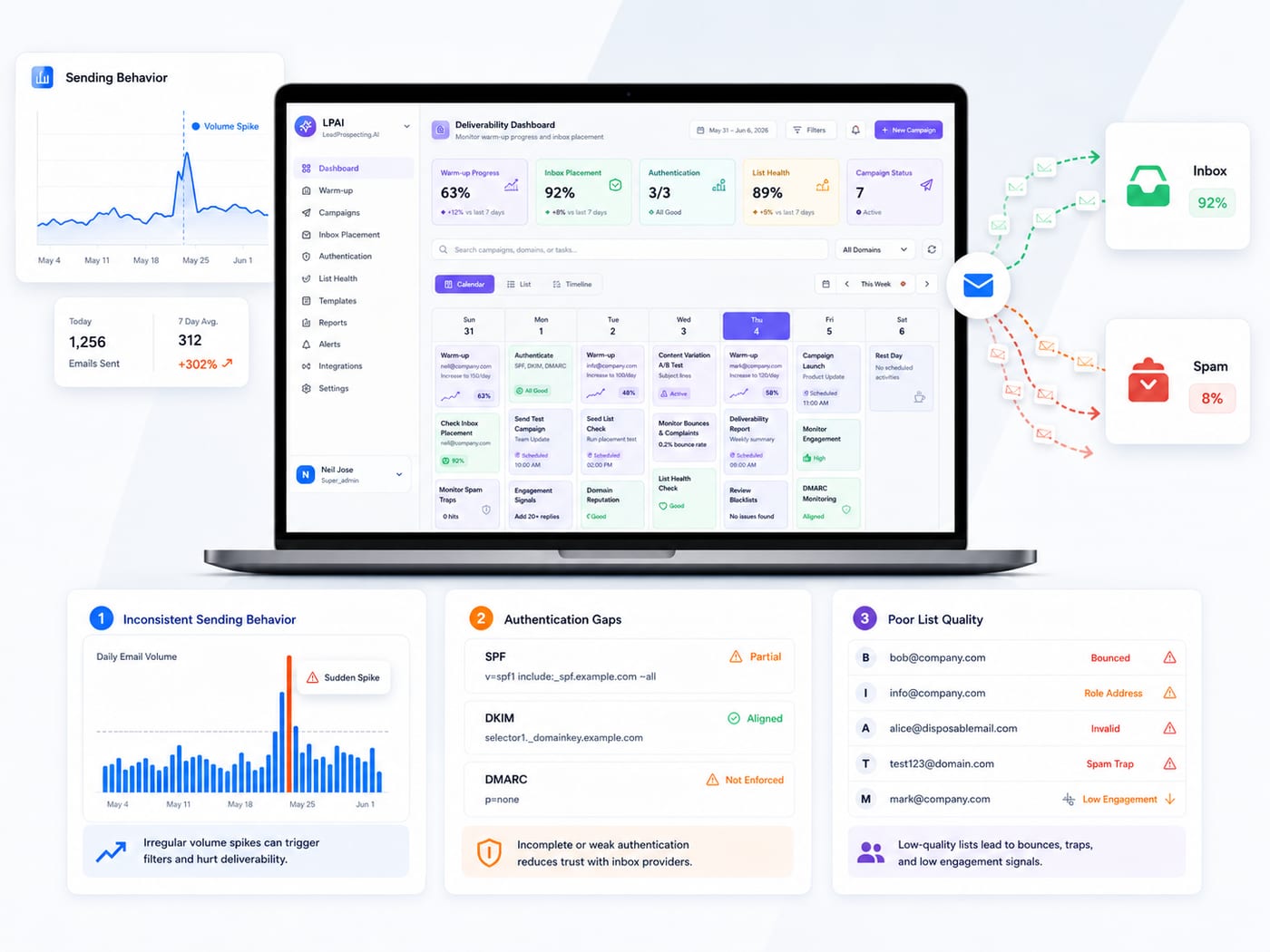
1. Check your SPF, DKIM, and DMARC records
Go to MXToolbox.com, enter your sending domain, and run the full DNS check. You need all three authentication protocols configured correctly. Google and Microsoft now reject or spam-filter mail from domains that fail authentication. This takes 10 minutes to check and under an hour to fix if something is missing.
Full guide: We walk through exactly what each protocol does and how to set them up in the cold email playbook.
2. Verify your sending domain's reputation
Log into Google Postmaster Tools (free for any domain owner) and check your domain reputation for Gmail. If it shows anything below "Medium," pause your campaigns until you've addressed the underlying issue. Common causes: high bounce rates from a previous send, spam complaints, or sending from a domain with no warmup history.
3. Clean your list
Remove every contact who hasn't opened an email from you in the last 90 days. Remove any hard bounces from previous sends. If you're using a list that's more than six months old without verification, run it through an email verification tool before sending. A clean list of 300 engaged contacts will outperform a bloated list of 2,000 stale addresses every time.
4. Confirm your sending domain is separate from your primary domain
If you're sending cold outreach or promotional campaigns from the same domain that handles your invoices and client emails, stop. One bad campaign can push your main domain into spam, which means your operational emails stop reaching customers too. Register a separate sending domain (about $12 a year), authenticate it, and warm it before you send.
Full guide: The warmup vs. deliverability post covers when you need warmup, when you need monitoring, and how to set up both.
5. Warm your domain if it's new or dormant
If your sending domain is newer than 90 days or hasn't been used for email in the last 60 days, do not send a full campaign from it. Start at 10 to 20 emails per day, increase gradually over 4 to 6 weeks, and let inbox providers build a trust profile for your domain. Sending 500 emails from a cold domain on day one is the fastest path to a spam folder.
Full guide: The comprehensive email warming, drip campaigns, and platform comparison guide covers the full warmup timeline and process.
6. Segment your list into at least three groups
Do not send the same email to everyone. At minimum, split your list into three segments: new leads who haven't converted, past customers you want to re-engage, and active leads currently in your pipeline. HubSpot's research found that segmented emails drive 50% more clickthroughs and 30% more opens than unsegmented ones. Three segments is the minimum. More is better.
Full guide: The drip campaign mistakes post covers segmentation strategy in detail, including how to build a five-touch automated sequence for service businesses.
7. Run a test send and check inbox placement
Before you commit to a full campaign, send a test to a small group (10 to 20 addresses across Gmail, Outlook, and Yahoo) and check where the email actually lands. Did it hit the primary inbox, the promotions tab, or spam? If it's landing in spam or promotions on the test, it will land there for your entire list. Fix the issue before scaling. Tools like Mail-Tester (free) will score your email and flag specific problems.
The compound effect
Each item is small on its own. Together, they're the difference between a Q2 campaign that generates pipeline and one that silently bleeds budget into spam folders.
LeadProspecting AI handles most of this automatically: email warming, authentication monitoring, list verification, CRM-based segmentation, and inbox placement tracking all run from one platform. If you want to see how it works, the free trial is the fastest way to find out.
Frequently asked questions
How far in advance should I start preparing for a major email campaign? Six weeks is ideal. That gives you four weeks of domain warming plus two weeks for list cleaning, segmentation, and test sends. If your domain is already warmed and authenticated, you can compress this to one to two weeks of list prep and testing.
What if I've already sent Q2 campaigns and my open rates are low? Pause the campaign. Run through this checklist from the top. Check authentication, check domain reputation in Google Postmaster Tools, clean your list, and send a test to see where your emails are landing. Most open rate problems trace back to deliverability (emails in spam), not copy. Fix the infrastructure before you rewrite a single subject line.
Can I use this checklist for every campaign or just seasonal pushes? Every campaign. Items 1, 2, and 4 are set-and-forget once configured correctly (just verify periodically). Items 3, 6, and 7 should happen before every major send. Item 5 only applies when you're launching a new domain or reactivating a dormant one. Build the checklist into your pre-send process and it becomes second nature within a month.