Your Emails Are Disappearing, And March Made It Worse
You spent hours crafting the perfect email campaign. The copy is solid, the offer is compelling, and your list is ready. Then… nothing. Your open rates plummet. Your team asks why nobody's responding. The brutal truth: roughly one in six emails never reach the inbox.
March doesn't make this easier. With winter lead follow-ups ramping up and spring campaigns launching, email inboxes are more crowded and more protected than ever. Gmail, Yahoo, and Microsoft are enforcing stricter authentication standards. Even well-intentioned campaigns are landing in spam folders or disappearing entirely. If your deliverability rate has tanked this quarter, you're not alone. Organizations sending 1M+ emails monthly are seeing inbox placement below 28%, meaning 7 in 10 emails are filtered or rejected.
The good news: email deliverability disasters are preventable. The bad news: fixing them requires action now, not later. Here's what you need to know and exactly how to fix it.
Why Your Emails Are Failing Right Now
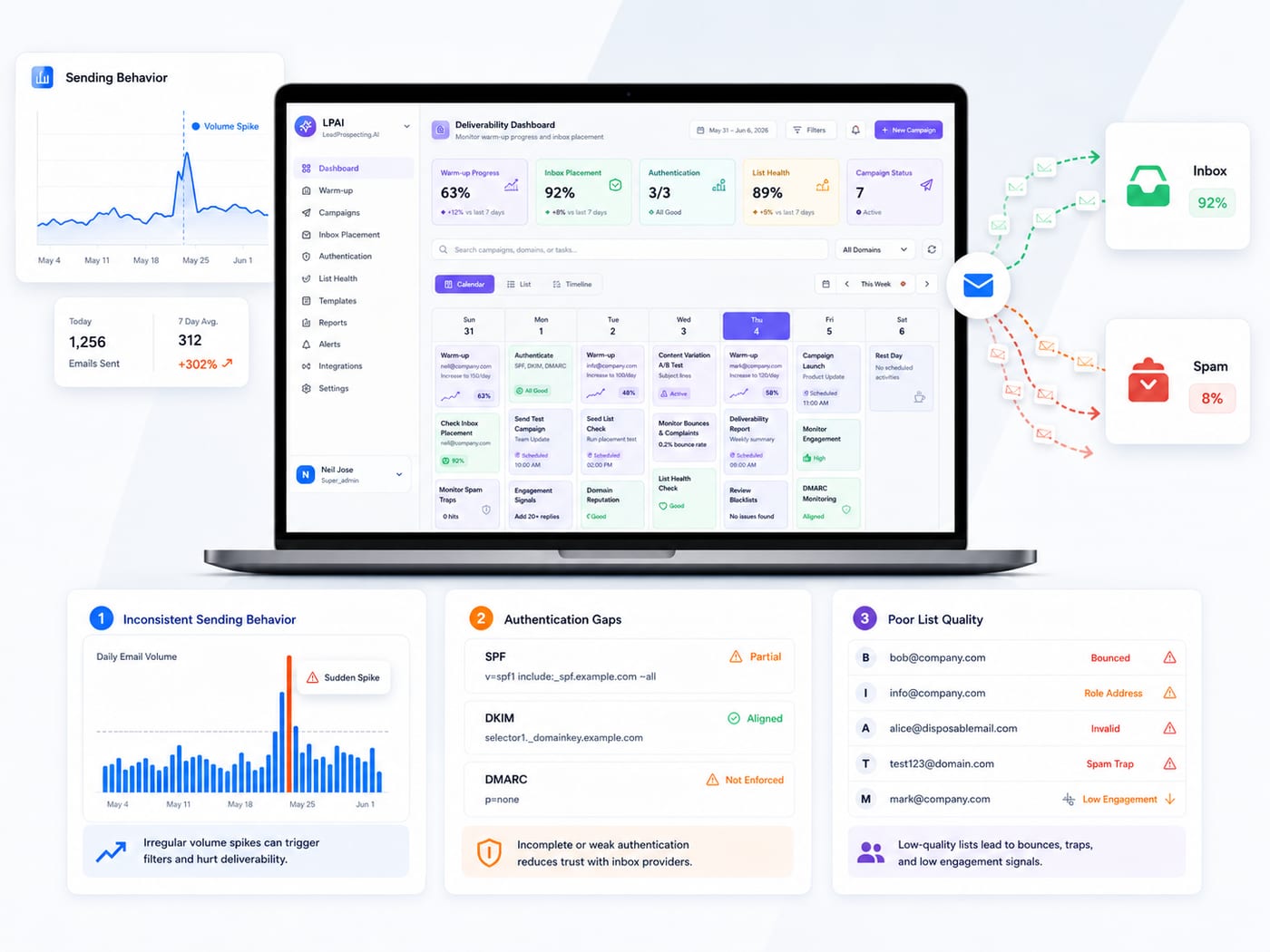
Email deliverability used to be about content and engagement. Now it's almost entirely about authentication, sender reputation, and compliance. SPF, DKIM, and DMARC are important for preventing spam, phishing attacks, and other email security risks. Gmail and Yahoo made these mandatory in February 2024, and email warming services that focus on domain reputation have become essential for staying in the inbox.
Authentication is the core problem. Only 18.2% of top 10 million domains have valid DMARC records, with merely 7.6% enforcing policies. If your domain isn't properly authenticated, mailbox providers treat you like a spammer, regardless of your actual intent.
Then there's sender reputation. Microsoft uses different levels such as Spam Confidence Level (SCL) and Bulk Complaint Level (BCL) to determine email placement. One spam complaint, one bounce you didn't clean, one angry unsubscribe, and your reputation tanks. From there, your entire email strategy suffers.
Third, list hygiene is killing campaigns. Almost 33% of email recipients feel disappointed when the company's marketing messages land in spam instead of their inboxes, and 10% of contacts lose trust in the brand if they see their emails in the spam folder. Yet most organizations never test their actual inbox placement, and many skip list validation entirely.
The March Compliance Deadline That Isn't Going Away
Here's the reality: Starting February 1, 2024, email senders who send more than 5,000 messages per day to Gmail accounts must set up SPF and DKIM email authentication for their domain, and set up DMARC email authentication for their sending domain. If you're still not compliant, Gmail and Yahoo aren't just limiting your deliverability; they're actively rejecting non-compliant mail.
The enforcement is escalating. Keep spam rates reported in Postmaster Tools below 0.3%. Exceed that, and your emails get quarantined or outright blocked. This isn't a guideline, it's a hard limit.
March is prime time for campaigns failing at scale because teams didn't invest in authentication setup or domain warm-up in February. If you haven't moved from p=none to p=quarantine or p=reject in your DMARC policy, you're running exposed.
How to Fix Your Email Deliverability in Three Steps
Step 1: Authenticate Your Domain (SPF, DKIM, DMARC)
Organizations with full SPF, DKIM, and DMARC enforcement plus aged domains consistently achieve 85–95% inbox placement. This isn't optional; it's the foundation of deliverability.
- SPF (Sender Policy Framework): SPF records list all the IP addresses of all the servers that are allowed to send emails from the domain. Add your sending servers to your SPF record immediately.
- DKIM (DomainKeys Identified Mail): DKIM verifies the email's integrity and authenticity using digital signatures. Enable DKIM signing for every domain you send from.
- DMARC (Domain-based Message Authentication, Reporting & Conformance): DMARC tells a receiving email server what to do given the results after checking SPF and DKIM. Start with p=none to monitor, then move to p=quarantine, then p=reject as you gain confidence.
This step alone can lift your inbox placement by 20%+ if you're currently unauthenticated.
Step 2: Warm Your Domain and Monitor Sender Reputation
Even authenticated senders struggle if their domain is new or their reputation is burned. In our experience, domain warm-up isn't just best practice; it's critical infrastructure. Start slow, scale gradually, and monitor reputation metrics daily.
- If you're using a new sending domain, expect a 30-point deliverability penalty vs. mature domains. Warm it up over 2-3 weeks by starting with small volumes and monitoring bounce and complaint rates.
- Keep spam complaint rates below 0.1% (and definitely below 0.3%). One malformed campaign, one purchased list, or one re-engagement attempt can trigger filtering across your entire domain.
- Monitor email warming metrics and sender reputation dashboards daily during March. Catch issues before they cascade.
This is why email warm-up tools designed for deliverability have become table stakes for serious senders.
Step 3: Clean Your List and Honor Engagement Signals
Authentication and warm-up don't matter if your list is full of dead emails and unengaged contacts. Email drip campaigns work best on clean, engaged lists.
- Remove any email that's bounced hard or marked spam. Don't resend to those addresses.
- Segment by engagement: prioritize opens and clicks, suppress inactives, and re-engage strategically (not aggressively).
- Validate email addresses before sending. Only 23.6% of B2B marketers verify email lists before campaigns, which is why they're losing 7 in 10 emails to the spam folder.
- Never buy lists. Never scrape. Work with verified lead sources that validate contact data in real time.
Why LeadProspecting AI Solves This Problem
Most businesses are stuck juggling email platforms, CRM tools, and deliverability checklist items separately. You authenticate in one tool, warm up domains in another, and manage lists in a third. By March, nothing talks to anything else, and your campaigns fail by default.
LeadProspecting AI combines email warmth, authentication setup, and built-in CRM workflow management into one platform. You get consistent inbox placement because your domain reputation, authentication, and list hygiene are managed as an integrated system, not a collection of disconnected tools.
You also get lead verification built in, so every email address in your campaigns is validated and current. No dead emails. No purchased lists. No guessing. Just verified contacts that actually exist and are worth reaching.
And if you're running multiple campaigns in March, our automation workflows manage follow-ups, segmentation, and re-engagement automatically, keeping you compliant and engaged without manual work.
What to Do Right Now (Today)
1. Check your authentication status. Go to your domain DNS settings and verify SPF, DKIM, and DMARC are published and passing validation. Use MXToolbox or Google's Postmaster Tools to check.
2. Review your spam rates. Log into Gmail Postmaster Tools and Yahoo Feedback Loop. If you're approaching 0.3%, pause campaigns and audit your list immediately.
3. Validate your sending domain age and reputation. New domains get harder filtering. If you launched your sending domain in February, expect penalties through April. Plan accordingly.
4. Audit your list. How many emails bounced last month? How many were marked spam? Remove hard bounces, suppress complainers, and re-validate your entire active list.
5. Set up monitoring. Email deliverability changes hourly. Set up daily alerts on bounce rates, complaint rates, and inbox placement tests. Don't wait for poor metrics to find you.
Frequently Asked Questions
Q: My domain isn't authenticated yet. How long will it take to reach 85%+ inbox placement?
Authentication setup takes 1-2 days. But reaching 85%+ inbox placement takes 30-45 days, depending on your domain age and warm-up strategy. New domains face a 30-point penalty vs. mature ones, so plan for gradual improvement, not instant fixes.
Q: What's the difference between p=none and p=reject in DMARC?
p=none tells mailbox providers to deliver your email but monitor it. p=quarantine sends failing emails to spam. p=reject blocks them entirely. Start at p=none, monitor reports, move to p=quarantine once you see consistent success. Only move to p=reject after your legitimate senders are fully configured.
Q: Why am I still landing in spam if my authentication passes?
Authentication is necessary but not sufficient. Sender reputation, list quality, engagement rates, and content all matter. If your domain is new, your list has inactive emails, or your spam complaint rate is high, you'll still get filtered even with perfect authentication. Focus on all three pillars: authentication, warm-up, and list hygiene.
Q: Can I use a free email address (Gmail, Yahoo, Outlook) to send marketing campaigns?
Absolutely not. Gmail, Yahoo, and Microsoft all deprecate or block emails sent from free addresses to their services. You need a custom domain. If you're already sending from a free address, your campaigns are being filtered automatically, regardless of content.
Q: Do I need email warming if my domain is already authenticated?
Yes. Authentication proves you own the domain. Email warming builds your sending reputation so mailbox providers trust your volume. Think of authentication as your ID card and warm-up as your credit score. You need both.
Fix Your March Campaigns Before April Gets Worse
Email deliverability disasters aren't accidents; they're the result of skipping the technical foundations that mailbox providers now require. March is the month to fix this. If you're still running campaigns without proper authentication, domain warm-up, or list validation, every email you send is at risk.
The solution is simpler than you think: authenticate your domain, warm up your sender reputation, clean your list, and monitor your metrics daily. Do this, and you'll reach 85%+ inbox placement instead of 28%.
LeadProspecting AI handles email warming, authentication, and CRM follow-up in one integrated platform, so you don't have to stitch together five different tools. Start your free 21-day trial today, no credit card required. Test your email deliverability, set up your domain authentication, and see how consistent inbox placement actually feels. You'll wonder why you waited this long.